Tracking Claude Code & Codex Sessions: How IA Agent History & Token Analytics Supercharge macOS Development
Software engineering workflows have undergone a massive shift. Developers no longer rely solely on basic autocomplete; today, we pair with autonomous CLI coding agents like Claude Code and Codex to execute multi-turn refactors, write unit tests, and resolve complex edge-case bugs across full repositories.
However, as engineers run dozens of agent tasks daily across different terminals and projects, managing IA agent context has become a major productivity bottleneck.
The Multi-Agent Visibility Gap: Autonomous agents generate vast amounts of session history, token consumption, prompt cache metrics, and discovered repository constraints. Yet, these logs remain trapped in hidden local files (such as ~/.claude/projects/ JSONL records and ~/.codex/memories.sqlite databases). Without a unified dashboard, developers lose track of past session context, waste money re-prompting agents, and watch different agents make the exact same coding mistakes over and over.
1. Unified Session Capture & Token Analytics
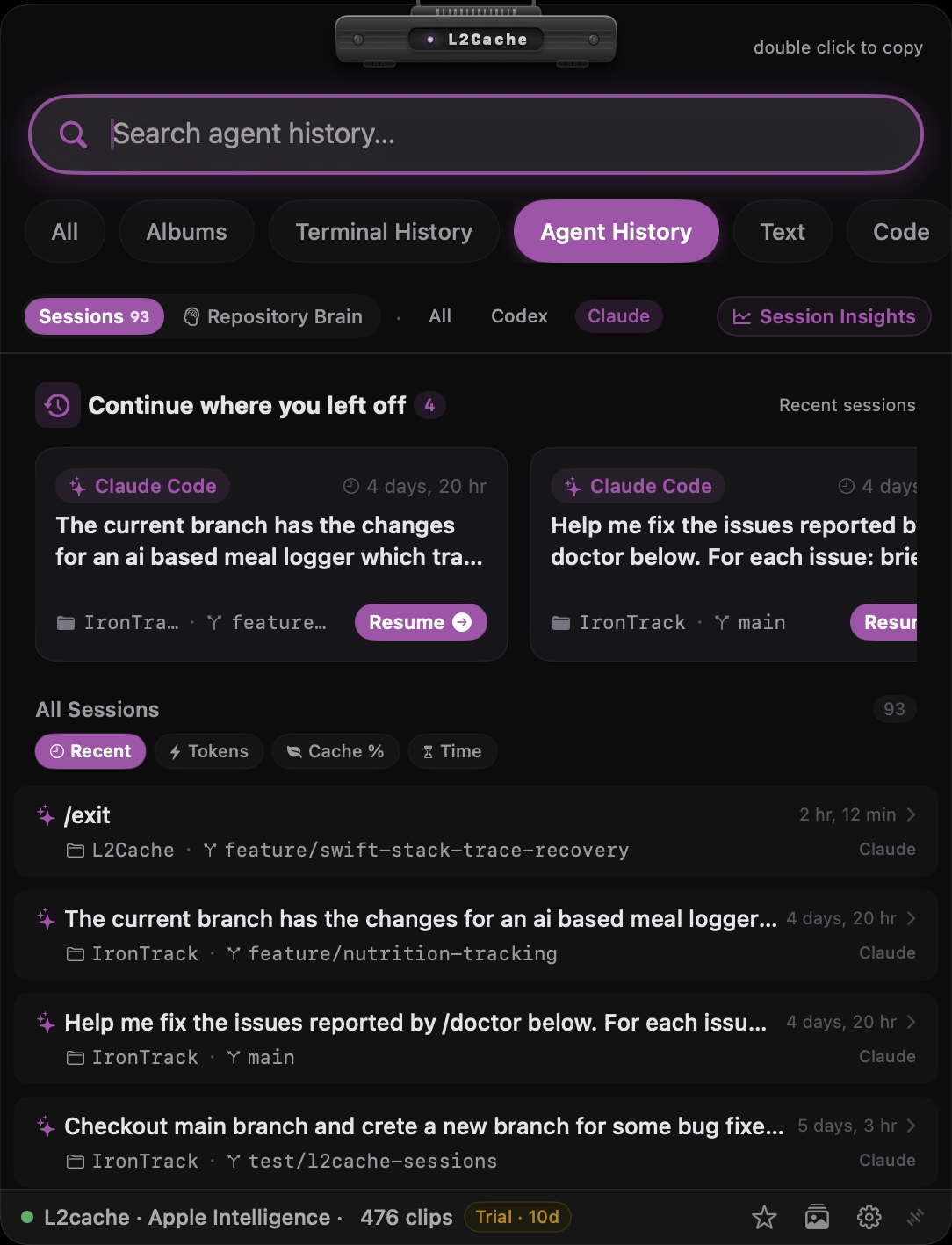
In L2Cache 1.4, we introduced native IA Agent History & Analytics—bringing full visibility to your CLI agent sessions directly from your Mac's menu bar or global hotkey (⌥Space).
L2Cache automatically parses and indexes local agent logs in real time, giving developers zero-cloud access to critical session metrics:
Real-Time Token & Cost Breakdown
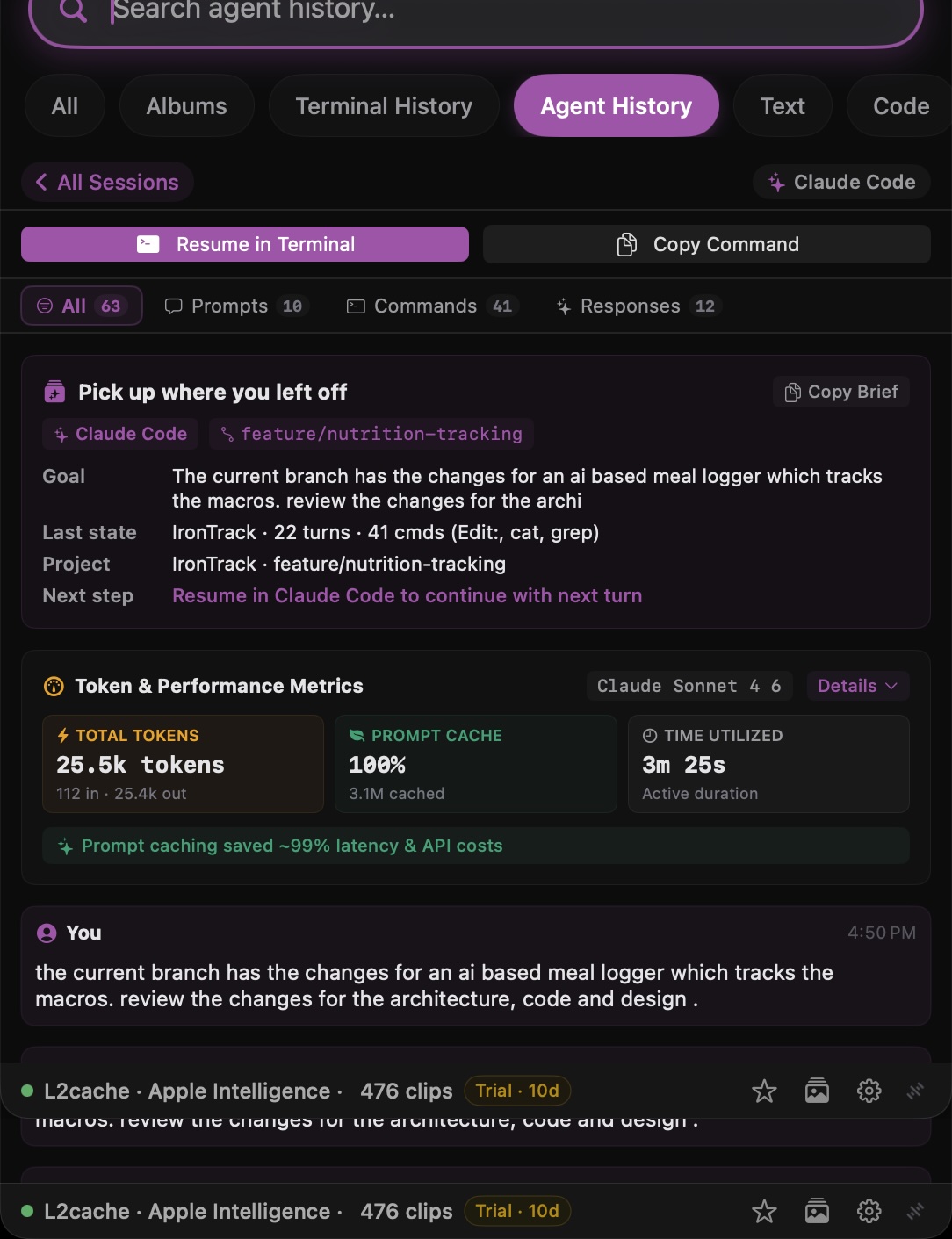
View total input tokens, output tokens, and overall token consumption for every session across Claude Code and Codex. Instantly identify token-heavy prompts or runaway context loops before they inflate API bills.
Prompt Cache Efficiency (Cache Hit Ratio)
Track cacheReadTokens and prompt cache hit ratios. See exactly how effectively your agent sessions leverage LLM prompt caching, allowing you to optimize prompt structures for maximum speed and cost efficiency.
Session Sorting & Filtering
Sort past sessions by Recent Activity, Total Tokens, Prompt Cache Hits, or Runtime Duration. Filter sessions by provider (Claude vs. Codex) or search through full conversation histories instantly with SQLite FTS5 fast search.
2. 1-Click Terminal Session Replay & Resume
One of the most frustrating parts of using CLI agents is resuming a session after switching terminals or closing a window. Previously, developers had to manually locate session UUIDs or inspect raw logs to run CLI commands:
# Manual session resumption in CLI
claude --resume a85fd1e8-3b4a-4f12-89cd-7e62a104f982
codex resume session_2026_09_08_build
With L2Cache, session resumption is seamless:
- Inspect any past session in the L2Cache floating panel to see full turn-by-turn prompts, tool executions, and file edits.
- Click "Resume in Terminal" to launch a fresh terminal window automatically attached to the selected agent session.
- Never lose your place or re-explain context when returning to a complex multi-hour debugging session.
3. Repository Knowledge Graph: Preventing Agent Memory Rot
When an agent spends 20 turns debugging a subtle AppKit threading bug, a SQLite concurrency issue, or a custom build flag constraint, it learns vital facts about your codebase. But when that session finishes, those insights often stay buried in local log archives.
L2Cache's Repository Knowledge Graph bridge converts transient agent discoveries into permanent repository documentation:
# Example AGENTS.md rule promoted from agent session #a85fd1e8
## AppKit & SwiftUI Concurrency Rules
- guard `view.window != nil` before displaying popovers in async tasks to prevent EXC_BAD_ACCESS.
- Never perform DB reads/writes on the main thread; use `Task` with `await`.
- Extract Discovered Gotchas: L2Cache parses agent execution logs to surface fragile components, recurring error tracebacks, and technical debt notes.
- 1-Click Promotion to AGENTS.md: Review extracted constraints and click "Promote to AGENTS.md" to write the rule directly into your project's root
AGENTS.mdorCLAUDE.mdfile. - Cross-Agent Alignment: Ensure all coding agents (Claude, Codex, Antigravity, or Cursor) share the exact same rules, preventing agents from repeating known bugs in future sessions.
4. 100% Local, Zero-Cloud Privacy
Just like L2Cache's core clipboard management, all Agent History & Analytics parsing occurs strictly on-device on your Mac. L2Cache reads local session logs directly from your home directory, stores analytics in local SQLite databases using GRDB, and never sends your prompts, code snippets, or token statistics to external servers.
Experience fast floating panel access, zero-cloud clipboard history, and native IA Agent History on macOS today.
Try L2Cache Gratuito